🧰
Software Engineering Practices
This page explains how planning, checklists, comments, mini-lessons, and project organization supported my game development.
| Learning Objective |
Project Evidence Required |
Assessment Method |
| Planning Changes |
Section 1 explains how the game changed over time through new features and improvements. |
Review blog evidence and project history. |
| Checklists & Burndown |
Section 2 explains how homework and milestones connect to the final game. |
Portfolio and sprint review. |
| Mini-Lesson Documentation |
Section 3 explains blog-style explanations and code highlights used to teach game features. |
Portfolio review of explanations and examples. |
✅
Specific Software Engineering Practices Requirements
1. Planning Changes
Requirement: Describe how the game changed over time through new features and improvements
Planning changes means showing how the project improved over time instead of appearing as one final version.
My Peppa Pig Fighting Game started as a smaller game idea and then grew into a more complete project with
extra gameplay systems, better organization, and more ways for the player to interact with the game.
- The game expanded from a basic battle idea into a multi-level boss fight.
- Multiplayer mode was added so two players could fight using separate controls.
- Character selection was added so players could choose names and sprites.
- Coins and scoring were added to reward survival and exploration.
- localStorage and leaderboard behavior were added so the game could remember scores and choices.
- API integration was added for music and leaderboard-style data.
// Example of a planned improvement: support either one-player or two-player gameplay
this.gameMode = config.gameMode ?? localStorage.getItem('peppaGameMode') ?? 'singlePlayer';

if (this.gameMode === 'twoPlayer') {
    this.classes.push({ class: Player, data: sprite_data_player2 });
} else {
    this.classes.push({ class: PeppaBossEnemy, data: sprite_data_enemy });
}
This proves the planning changes requirement because the page explains how the project gained new features
and became more advanced through multiple improvements.
2. Checklists and Burndown
Requirement: Connect homework and milestones to the final game
Checklists and burndown show how the project was broken into smaller tasks. Instead of trying to finish the
whole game at once, I connected individual homework topics and milestones to final game features. Each item
helped complete part of the larger project.
- Variables homework connects to player health, score, cooldowns, coin count, player names, and positions.
- Boolean homework connects to
battleEnded, isPlayerLaser, and attack flags.
- Classes and Variables homework connects to game objects and class properties.
- Functions homework connects to reusable methods such as
initialize(), updateHud(), and spawnLaser().
- Conditionals homework connects to win/loss checks, cooldown checks, collision checks, and mode checks.
- Array homework connects to
this.lasers, this.classes, this.coins, and this.leaderboard.
| Checklist Item |
Final Game Connection |
| Variables |
Health, score, cooldowns, coin count, player names, and positions. |
| Booleans |
Battle-ended flags, player attack requests, and laser ownership checks. |
| Functions |
Reusable gameplay methods like initialize(), updateHud(), and saveScore(). |
| Conditionals |
Win/loss logic, mode checks, collision checks, and API/localStorage fallbacks. |
| Arrays |
Lists of lasers, coins, classes, and leaderboard entries. |
This proves the checklists and burndown requirement because the portfolio connects class assignments and
smaller milestones directly to final game systems.
3. Mini-Lesson Documentation
Requirement: Use blog-style explanations and code highlights to teach game features
Mini-lesson documentation means explaining the code in a way that teaches another person how the feature works.
My project pages use headings, short explanations, code blocks, screenshots, and homework connections to explain
important CS111 concepts through the game.
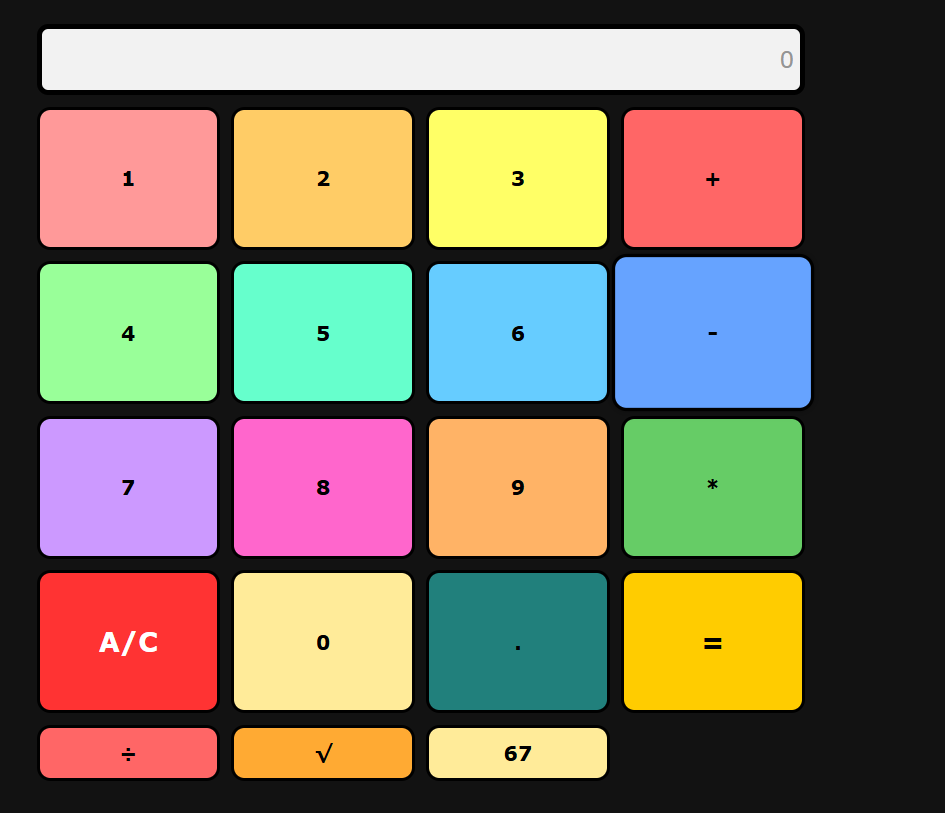
- The calculator project teaches operators, input, and real-time output.
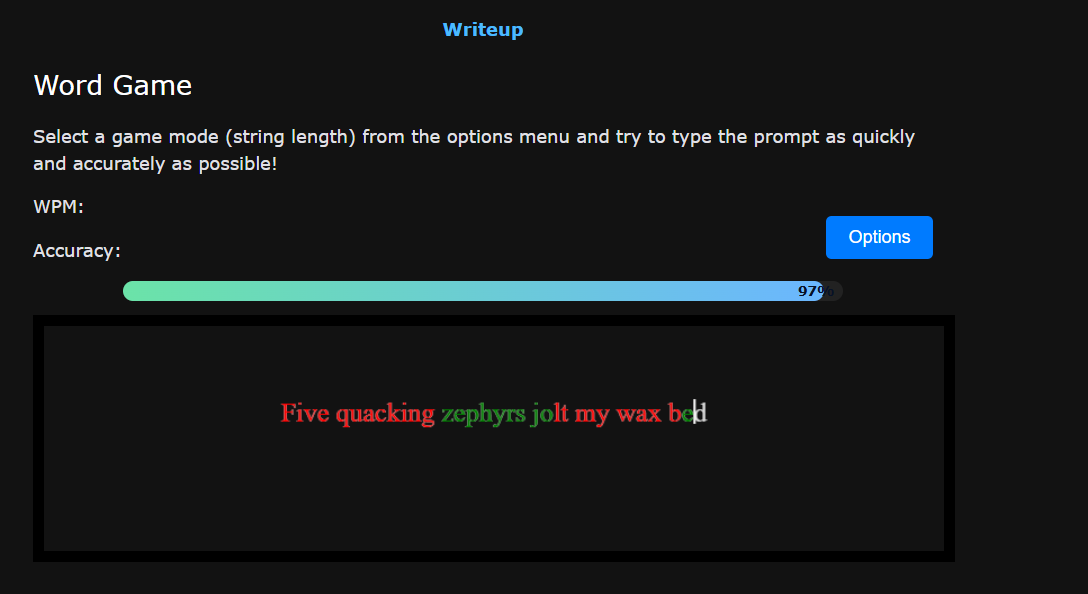
- The word game teaches strings, typing accuracy, WPM, and dynamic feedback.
- The Peppa Pig Fighting Game pages explain OOP, data types, control structures, API integration, and debugging.
- Code blocks highlight the exact parts of the project being explained.
- Blog sections connect each project feature to a CS111 concept.
// Example mini-lesson idea: explain how a button/input changes output
button.addEventListener('click', () => {
    this.start();
});

// Example mini-lesson idea: explain how scores are displayed dynamically
item.textContent = `${entry.name}: ${entry.score}`;
leaderboardDiv.appendChild(item);
This proves the mini-lesson documentation requirement because the page does more than list projects. It explains
what each project demonstrates and how the code connects to programming concepts.
🕹️
Additional Projects & CS111 Connections
Along with my Peppa Pig Fighting Game, I also built other projects that apply the same CS111 concepts in different ways.
These include a calculator and a word game, which demonstrate how programming ideas like input, output, conditionals,
strings, and DOM manipulation can be used across multiple applications.
▶ Calculator Project
|
▶ Word Game Project
🧮 Calculator — Operators, Input, and Real-Time Output
The calculator project focuses on handling user input and performing mathematical operations. Each button represents
an input event, and the program updates the display dynamically based on what the user presses.
- Clicking numbers builds an expression
- Operators like
+, -, *, and ÷ perform calculations
= evaluates the expressionA/C clears the screen√ adds an extra math feature beyond the four basic operations
This project strengthens concepts like variables, operators, functions, conditionals, and DOM manipulation.
It also shows how event-driven programming works in a web interface.
⌨️ Word Game — Strings, Accuracy, and Dynamic Feedback
The word game focuses on string handling and real-time feedback. The user types words or phrases, and the program
compares their input to the expected text while calculating speed and accuracy.
- Stores prompt text as a string
- Reads user input continuously
- Calculates WPM, which stands for words per minute
- Tracks accuracy based on correct characters
- Updates results live while the player is typing
Together, these projects show that I applied CS111 concepts across multiple types of programs, not just one game.
This demonstrates a deeper understanding of programming concepts and how they can be reused in different contexts.
These assignments connect directly to the concepts used in my game project. Each one helped build the skills needed
for features like player movement, health systems, class design, conditionals, arrays of lasers, coins, localStorage,
and API integration.
Variables Homework
Relates to storing values like player health, score, cooldown timers, coin count, player names, and positions.
Boolean Homework
Connects to game-state flags like battleEnded, isPlayerLaser,
attackRequested, and whether the game is in single-player or two-player mode.
Classes and Variables Homework
Supports the class-based structure of the game, where the level, player, enemy, coins, lasers, and leaderboard
data are managed through objects and class properties.
Functions Homework
Connects to methods like initialize(), updateHud(), generateCoins(),
spawnLaser(), saveScore(), and loadLeaderboard().
Conditionals Homework
Relates to win and lose conditions, cooldown checks, collision checks, player mode checks, and API/localStorage
error handling.
Classes and Methods Homework
Connects to object-oriented programming in the project, especially the reusable PeppaBattleLevelBase
class and its gameplay methods.
Array Homework
Relates to arrays like this.lasers, this.classes, this.coins,
and this.leaderboard.
← Back to College Ready Blog